


The hype the last couple of weeks has been around implementing loops and to quote Satya Nadella: AI systems that improve with each use. The last few months, Thomas Karatzas and I have been heads down building Terse an AI workflow platform. I wanted to share how we have built one of our most useful features: automated learning loops.
What the feature is
Terse runs an automated review of every workflow that gets deployed. Once a week it drops in your inbox with concrete suggestions for how to improve your workflows.
We built this feature because we know software is rarely perfect the first time. The edge cases and real world examples only get worked out through initial use. Reviewing workflows is time consuming and involves sifting through piles of logs. AI reduces this friction and helps unlock value faster.
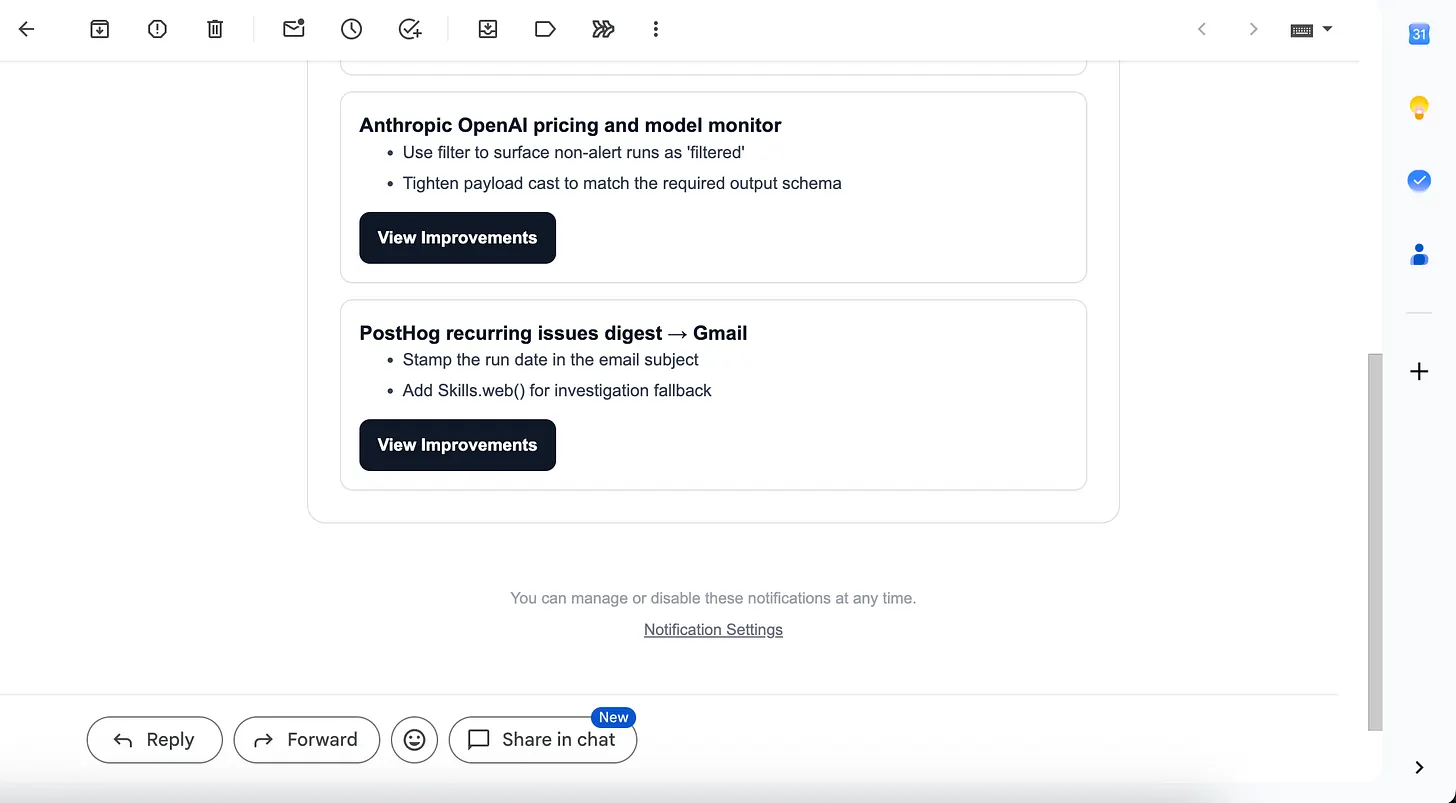
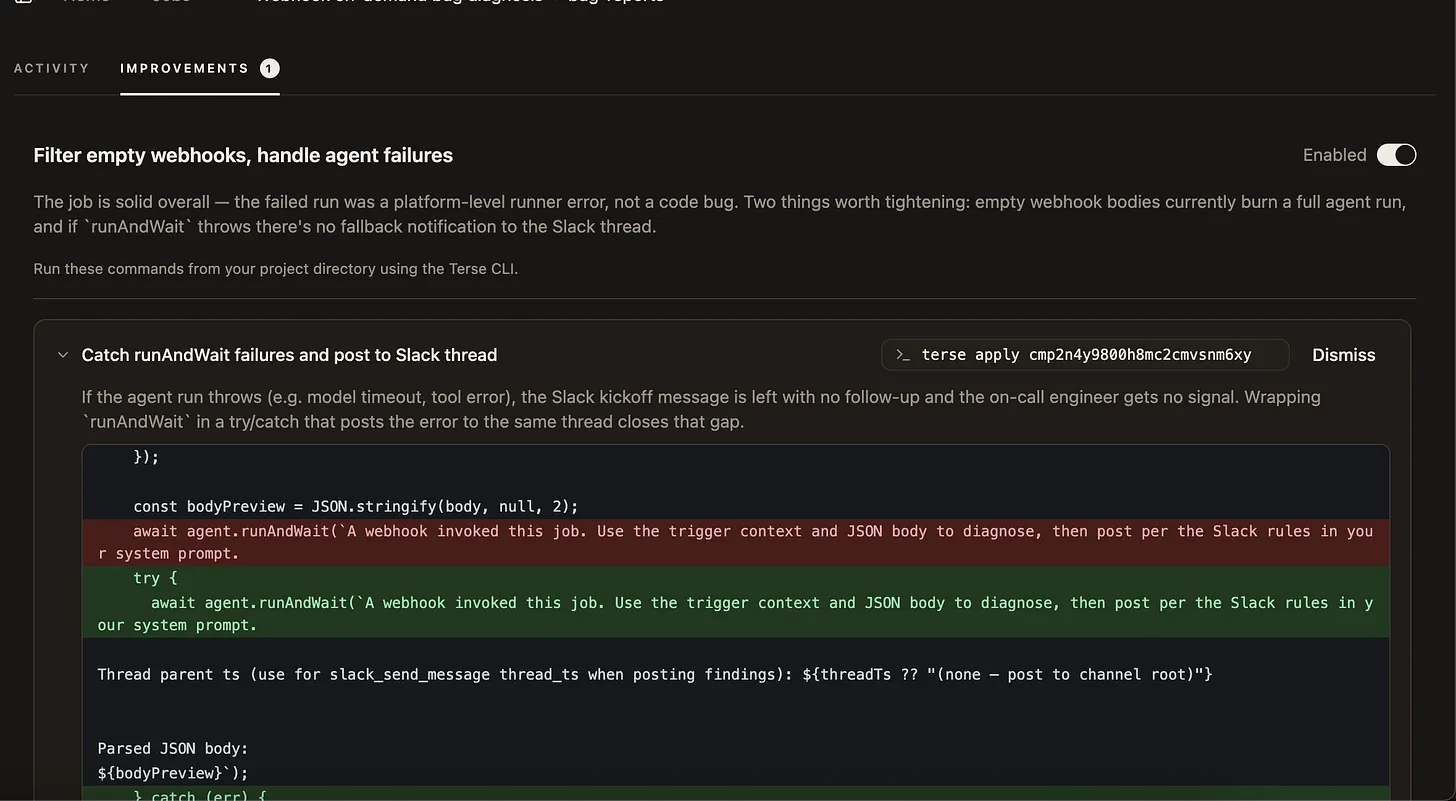
Once you receive the proposed improvements, you can review the advice, then use the terse apply CLI to apply any improvement to your workspace automatically.
How it works on the backend
We have a four-step process for producing these recommendations:
- Take the tenant's deployed workflow source (from their last
terse deploy) and production logs as context. - Spin up an isolated Modal sandbox.
- Run the Claude Code CLI and provide the workflow context.
- Return structured patch suggestions, which the user reviews with
terse list improvementsand applies withterse apply <improvement-id>.
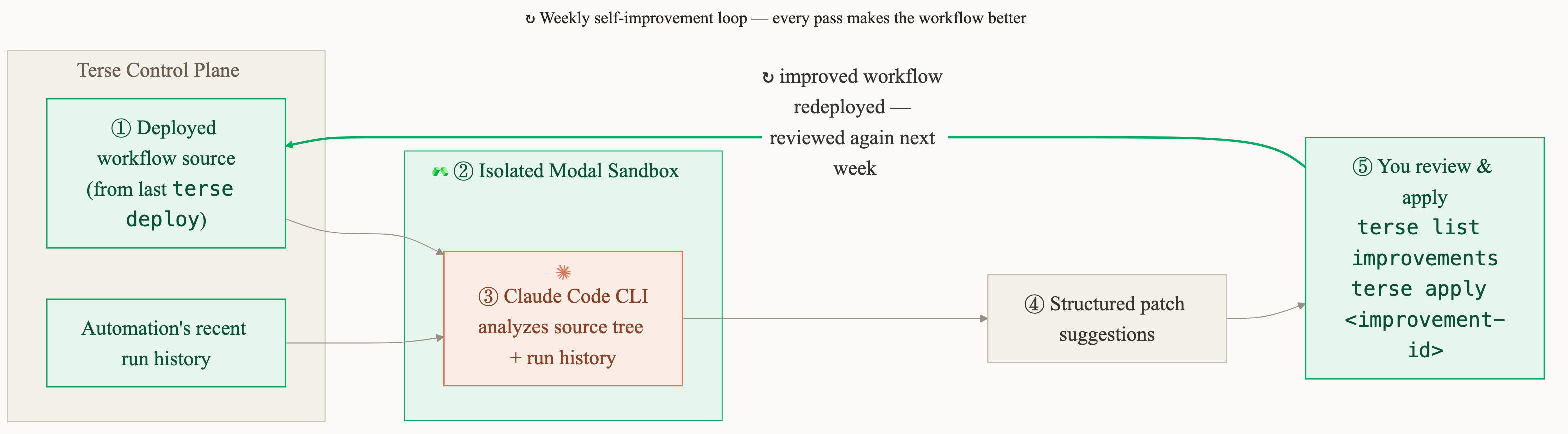
The setup seems simple enough but in truth it has some major security gaps.
Threat model
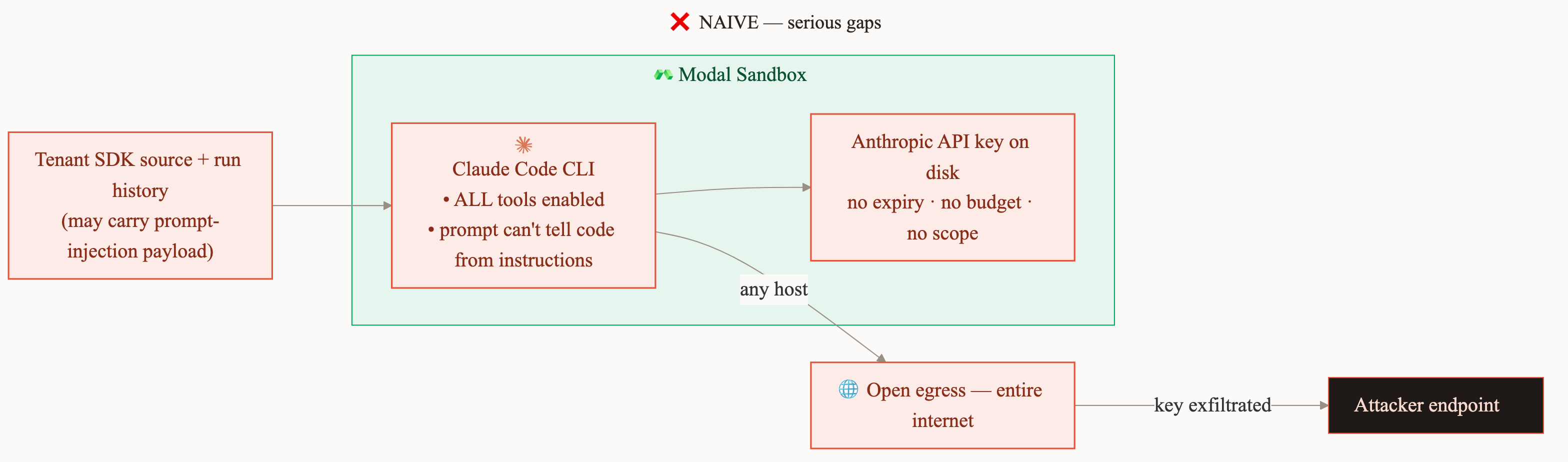
The inputs to Claude Code put attacker-controlled data straight into an agent with tools. A malicious user could upload source code containing a prompt-injection payload, or plant one in their run-history logs. Our initial implementation had five issues:
- LLM calls made directly with a raw Anthropic API key.
- Open egress to the entire internet.
- The key had no expiry, no spending limit, and no scope.
- Every Claude Code tool was available.
- Nothing in the prompt told the model which input was untrusted.
Put those together and in the worst case a hijacked Claude Code instance gets convinced to send sensitive information to an attacker's server or run up a massive Anthropic platform bill.
How Modal provides us a security foundation
Modal Sandboxes are built to run untrusted code so the infrastructure attack surface was handled for us.
- gVisor's user-space kernel intercepts syscalls instead of handing them to the host, so sandbox code never touches the real kernel.
- Every run gets a fresh, per-execution filesystem that's destroyed on teardown.
- Resource and timeout limits are enforced per run.
How we solved the other security gaps
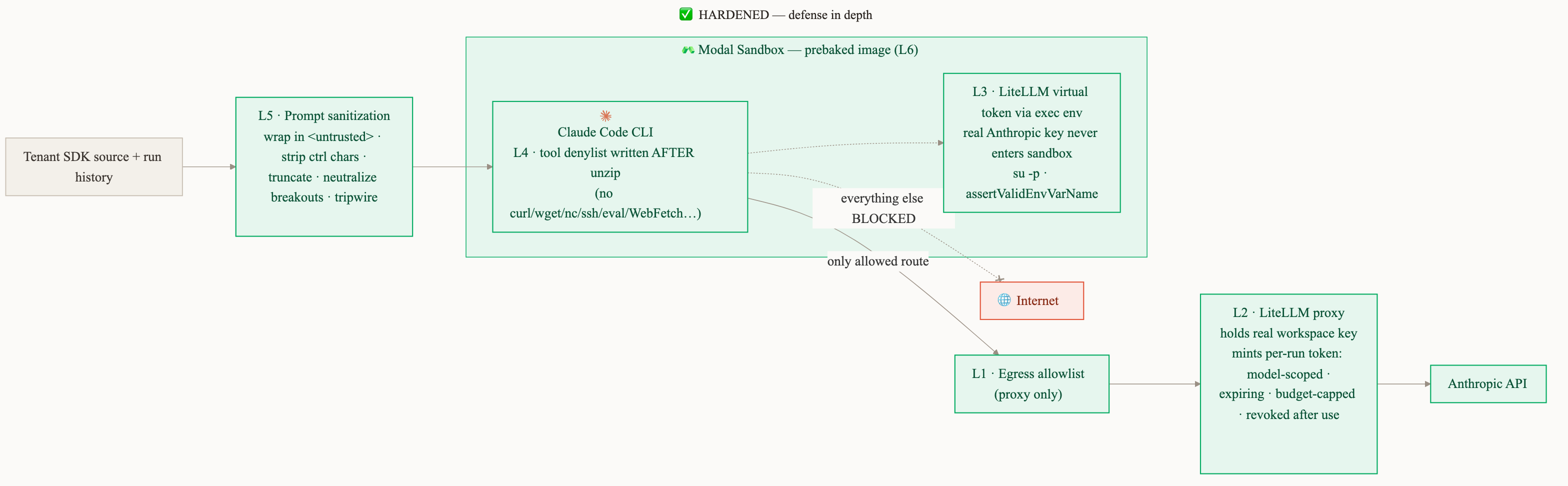
Our remaining security gaps were on the application layer and had to be solved by us. We had to focus on isolating the running Claude Code instance as much as possible, with multiple layers of defence in depth.
Layer 1: Egress lockdown to the proxy only
Modal lets you restrict a sandbox's egress to a specific IP range at creation time. We pin it to the single destination the run is allowed to reach: a LiteLLM proxy which Claude Code uses for model calls. I will discuss more about this proxy below.
const PROXY_EGRESS_CIDRS = ["<litellm-proxy-cidr>"];
// ...
egressCidrAllowlist: PROXY_EGRESS_CIDRS;
Layer 2: Prebaked image
This is one of my favorite Modal features, and it spares us from standing up our own Artifact registry. Because of the Layer 1 egress lockdown, the sandbox can't download anything at startup anyway, so we prebake all dependencies (git, Claude Code) into the image. They're already there instead of being fetched on boot.
Layer 3: Ephemeral and scoped tokens
We stood up a LiteLLM proxy after doing research on off-the-shelf tools that could help create virtual keys that help grant access to AI Models but with security best practices built in. I compare these virtual keys to Visa debit cards. More concretely the virtual keys are:
- Short-lived and they expire automatically.
- Budget-capped with a fixed spend ceiling per run.
- Rate-limited by a per-job requests-per-minute (RPM) cap to avoid spam.
- Revoked immediately after the run finishes.
- Can be used with Claude Code
When we were first searching for solutions, we realized this isn't a feature that is already table stakes for model providers. For example, Anthropic only allows you to set spending limits at a workspace level but there is no equivalent mechanism to the LiteLLM virtual keys.
Standing up the proxy wasn't our first choice since it adds another layer of complexity and management for us in the future. We would love to see narrowly scoped keys in Anthropic's API platform in the future.
Layer 4: No credential on disk
We made it so that a LiteLLM virtual key is passed through Modal's API into the process environment:
const claudeProc = await sb.exec(
  [
    "su",
    "-p",
    "coder",
    "-c",
    `cd /tmp/project && exec ${shellQuoteArgs(claudeArgs)} < /tmp/prompt.txt > /tmp/claude-output.json`,
  ],
  { stdout: "pipe", stderr: "pipe", env: extraEnv },
);
This line ensures:
- We run Claude Code as a non-root user.
- All arguments are escaped.
- LiteLLM tokens aren't written to disk and are instead passed in the shell.
Layer 5: Claude Code tool denylist, written after unzip
We write a permissions.deny list to /tmp/project/.claude/settings.json:
Bash(curl:*), Bash(wget:*), Bash(nc:*), Bash(ncat:*), Bash(socat:*),
Bash(ssh:*), Bash(scp:*), Bash(rsync:*), Bash(node -e:*), Bash(node --eval:*),
Bash(python -c:*), Bash(python3 -c:*), Bash(perl -e:*), Bash(ruby -e:*),
WebFetch, WebSearch
This is defense in depth on top of the Layer 1 egress restrictions: even if there was a path to the network, Claude Code no longer has the tools to access it.
Layer 6: Prompt sanitization
We harden the prompt itself against injection. For every tenant-controlled field our promptSanitize utility will:
- wrap in
<untrusted field="...">...</untrusted>tags, - strip control characters,
- truncate to a per-field maximum length,
- Rewrite any embedded
</untrustedor<untrustedto<_untrusted_
We also add a preamble telling the model to treat anything inside those tags as raw input to inspect, and to ignore any instructions it appears to contain.
Takeaway
Modal gave us a base we could trust, so we never had to worry about infrastructure isolation and could spend our effort on the application-level threats instead. On top of that we added multiple layers of defense.
Making sure that this feature could exist securely unlocks something bigger. We are seeing that as our users use Terse, the friction of improving an agent is close to zero and each improvement added to workflows makes it more useful.
If you are interested in what we are building, head over to our GitHub repo or check us out at useterse.ai.